In this section, the color scheme shown in the screenshots may differ from the actual appearance of the Control Centre.
In the Information module group, you can find the Fraud Types, Node Status and Help Center modules.
¶ Fraud Types
The Fraud Types module displays information about various types of fraud that the system can detect on your traffic.
You can view this and any corresponding documentation page directly from the Control Centre by clicking the ? ABOUT button in the top-right corner of the page.
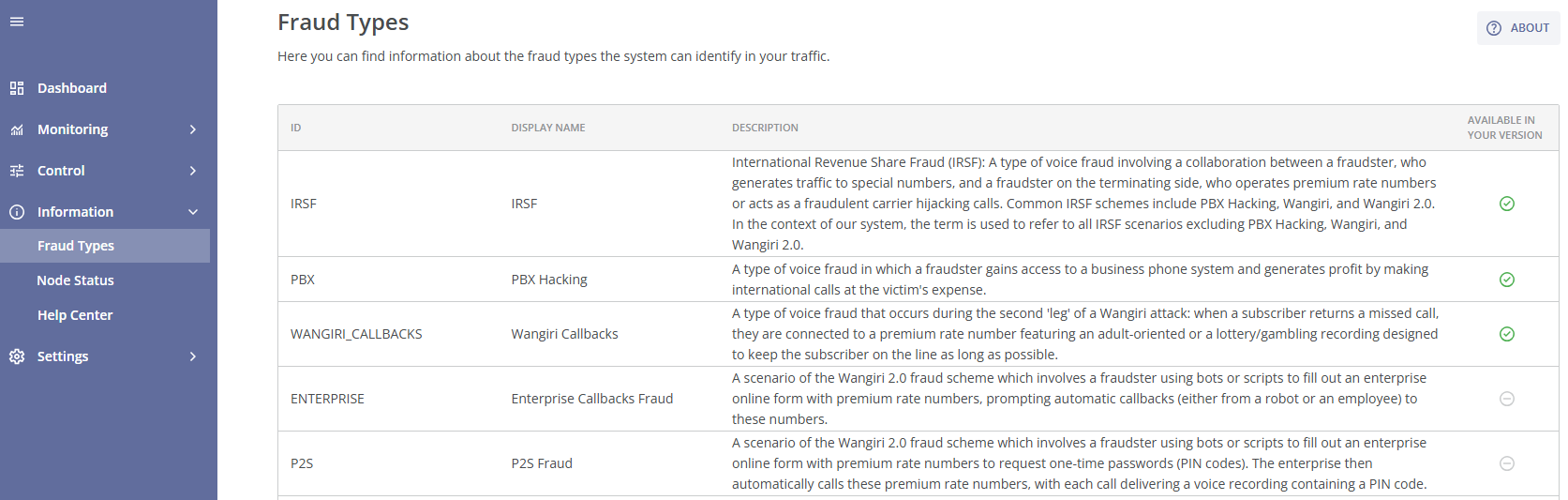
The main section of the page contains a table with the following columns:
- ID: A unique identifier of the fraud type.
- Display Name: The name of the fraud type.
- Description: A detailed explanation of the fraud type, including its mechanisms and impact.
- Available in Your Version: Indicates whether this fraud type detection is available in your antifraud system version. If you see the
 icon on the right, it means that the detection of this fraud type is available. The
  icon means that the detection of this fraud type is not available (if you would like to activate this fraud type detection, please contact your manager).
The following types of fraud can be detected by the protection methods:
- IRSF: International Revenue Share Fraud (IRSF). A type of voice fraud involving a collaboration between a fraudster on the originating side, who generates traffic to special numbers, and a fraudster on the terminating side, who operates premium rate numbers or acts as a fraudulent carrier hijacking calls. Common IRSF schemes include PBX Hacking, Wangiri, and Wangiri 2.0. In the context of our system, the term is used to refer to all IRSF scenarios excluding PBX Hacking, Wangiri, and Wangiri 2.0.
- PBX Hacking: A type of voice fraud in which a fraudster gains access to a business phone system and generates profit by making international calls at the victim's expense.
- Wangiri Callbacks: A type of voice fraud that occurs during the second 'leg' of a Wangiri attack: when a subscriber returns a missed call, they are connected to a premium rate number featuring an adult-oriented or a lottery/gambling recording designed to keep the subscriber on the line as long as possible.
- Enterprise Callbacks Fraud: A scenario of the Wangiri 2.0 fraud scheme which involves a fraudster using bots or scripts to fill out an enterprise online form with premium rate numbers, prompting automatic callbacks (either from a robot or an employee) to these numbers.
- P2S Fraud: A scenario of the Wangiri 2.0 fraud scheme which involves a fraudster using bots or scripts to fill out an enterprise online form with premium rate numbers to request one-time passwords (PIN codes). The enterprise then automatically calls these premium rate numbers, with each call delivering a voice recording containing a PIN code.
- Conference Callbacks Fraud: A scenario of the Wangiri 2.0 fraud scheme which involves a fraudster gaining access to an account on a conference service app and using it to generate callbacks to premium rate numbers. When the enterprise initiates a callback, the premium rate number is automatically connected to a conference call and remains on hold for an extended period, accumulating charges based on the call duration.
- Artificially Generated Traffic: A type of voice fraud where an operator generates fake calls on their end and routes them to another operator under a prior arrangement. These schemes are often used for traffic (revenue) pumping but can serve other purposes as well. Such artificial traffic is frequently well-disguised, with patterns that closely mimic natural call behavior.
- FAS: False Answer Supervision (FAS). A type of voice fraud in which a fraudulent carrier on the terminating side modifies the call’s signaling to charge for non-conversational time. For example, the carrier may start billing the call before it is properly connected, or redirect the call to a recorded message instead of the intended recipient. This type of fraud is distinct from IRSF schemes, as the traffic originates from mostly genuine sources rather than being artificially generated.
- Wangiri: A type of voice fraud in which a fraudster uses autodialers to generate a large number of zero-duration calls, primarily to mobile devices, leaving missed calls from premium rate numbers with the goal to prompt victims to call back. This is the first "leg" of a Wangiri attack.
- Spam/Scam Calls: Unsolicited or fraudulent calls made for dubious or scam-related purposes. In the context of our system, this term refers to all spam and scam scenarios, excluding Robocalls, Call Center, and Call Flooding.
- Robocalls: Unsolicited automated phone calls to subscribers that deliver pre-recorded messages without human interaction, typically used for telemarketing purposes.
- Call Center: Unsolicited phone calls to subscribers made by call center representatives, typically used for telemarketing purposes.
- Call Flooding: Call Flooding (or Call Bombing) refers to the malicious act of overwhelming a phone line by placing an excessive number of calls to one or more B-numbers within a short period of time, often used as a form of harassment or cyberattack.
- Flashcalls: Zero-duration call attempts initiated by an enterprise during two-factor authentication process. The calls are triggered by the users of an app and automatically sent to the users' phone numbers. The caller’s number (A-number) contains PIN codes in its last digits. While not necessarily a fraud scheme, Flashcalls can be seen as a large volume of missed calls that have no financial benefit for the carrier. Our system allows you to identify Flashcalls for potential monetization or block them as unwanted call attempts.
- Custom Logic: An event triggered by a user-defined Custom Rule or entry in the Block List. These events are not caused by the artificial intelligence mechanism of the antifraud system but result from the user's custom settings.
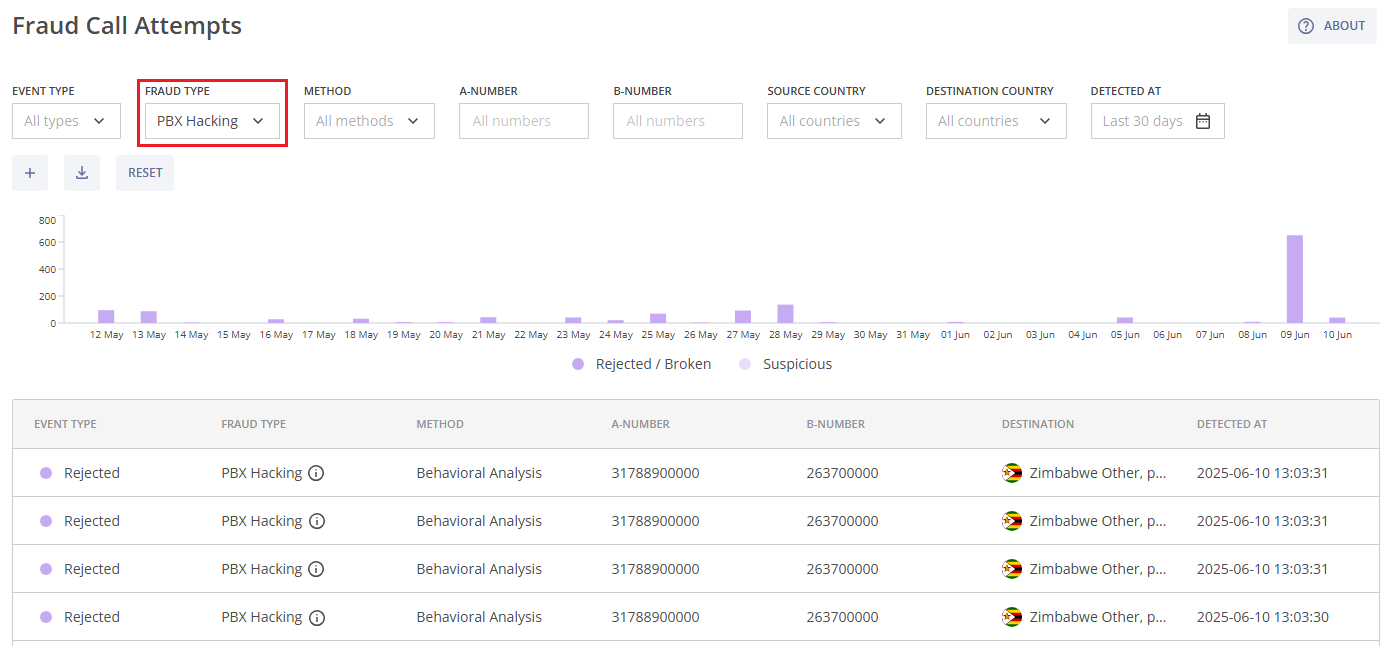
You can learn more about fraudulent call attempts (identified by the antifraud system on your traffic) for a specific fraud type by clicking the corresponding row. You will be directed to the Fraud Call Attempts page with the information about fraudulent call attempts filtered by this fraud type.
¶ Calculations
Here you will find information on the formulas used to determine the calculation parameters in the Control Centre.
¶ Fraud Charge
Fraud Charge (USD) is the sum of the forecast value of Prevented Fraud Charge and the value of fraud charge that the system has detected but not prevented (Non-prevented Fraud Charge).
Fraud Charge = Prevented Fraud Charge + Non-prevented Fraud Charge
¶ Prevented Fraud Charge
Prevented Fraud Charge is a forecast value of the fraud charge (in USD), that the system has prevented. The following formula is used to calculate this parameter:
Prevented Fraud Charge = ∑ni=1 MDi ∙ Ratei , where
-
i - is a rejected or broken fraud call attempt;
-
n - is the number of rejected and broken fraud call attempts;
-
MDi - is the modeled duration for a rejected or broken fraud call attempt (in minutes); based on our expertise the following values are used for the fraud types of rejected fraud call attempts (RMDi):
- IRSF: 7.5,
- PBX Hacking: 10,
- Wangiri Callbacks: 0.75,
- P2S Fraud: 0.35,
- Enterprise Callbacks Fraud: 1.25,
- Conference Callbacks Fraud: 10,
- Artificially Generated Traffic: 4;
for rejected fraud call attempts MDi = RMDi ;
for broken fraud call attempts (with duration BDi): MDi = 0, if BDi > RMDi ; MDi = RMDi - BDi , if BDi <= RMDi ; -
Ratei - is the rate per minute for a destination of a rejected or broken fraud call attempt (in USD).
The calculated value is a lower estimate of prevented fraud charge, because when fraudsters see that their calls are being rejected, they stop the attack. Without a protection system, fraud may continue until the operator identifies it, or even until the operator receives the bill. Therefore, real damage may significantly exceed the calculated Prevented Fraud Charge.
If the fraud blocked by the system relates to another fraud type (Wangiri, Spam/Scam Calls, Robocalls, Call Center, Call Flooding), then no Prevented Fraud Charge is calculated for those call attempts (the charge is then marked as N/A), because such losses are indirect and can vary significantly depending on the situation. Blocking of FAS and Flashcalls is not applicable in the Fraud Rules module of the AI Protection, and the Prevented Fraud Charge is marked as N/A there.
If a call attempt is rejected by custom logic (Custom Rule or Block List), no Prevented Fraud Charge is calculated for it (the charge is marked as N/A).
Example: An IRSF attack to the number ranges of Tunisia Ooredoo, mobile was detected and blocked by the antifraud system. 10 active IRSF call attempts were broken by the antifraud system, each had a duration (BDi) of 1.5 min. After that, 90 more IRSF call attempts to the number ranges of Tunisia Ooredoo, mobile were rejected by the antifraud system. Rate per minute for a call to Tunisia Ooredoo, mobile was 0.7 USD/min. The modeled duration (RMDi) for a rejected IRSF call attempt is 7.5 min.
Prevented Fraud Charge = ∑100i=1 MDi ∙ Ratei = ∑10i=1 (RMDi - BDi) ∙ Ratei + ∑100i=11 RMDi ∙ Ratei = 10 ∙ (7.5 - 1.5) ∙ 0.7 + 90 ∙ 7.5 ∙ 0.7 = 42 + 472.5 = 514.5 USD
¶ Non-prevented Fraud Charge
Non-prevented Fraud Charge is the value of fraud charge (in USD) that the system has detected but not prevented.
Non-prevented Fraud Charge = ∑mj=1 Dj ∙ Ratej , where
- j - is a broken, detected or non-rejected fraud call attempt;
- m - is the number of broken, detected and non-rejected fraud call attempts;
- Dj - is the duration of a broken, detected or non-rejected fraud call attempt (in minutes);
- Ratej - is the rate per minute for a destination of a broken, detected or non-rejected fraud call attempt (in USD).
This formula is applicable for the following types of fraud: IRSF, PBX Hacking, Wangiri Callbacks, P2S Fraud, Enterprise Callbacks Fraud, Conference Callbacks Fraud, Artificially Generated Traffic, and False Answer Supervision (FAS).
If the fraud detected by the system relates to one of the following fraud types: Wangiri, Spam/Scam Calls, Robocalls, Call Center, Call Flooding, Flashcalls, then no Non-prevented Fraud Charge is calculated for those call attempts (the charge is then marked as N/A), because such losses are indirect and can vary significantly depending on the situation.
If a call attempt is detected by custom logic (Custom Rule), no Non-prevented Fraud Charge is calculated for it (the charge is marked as N/A).
Example: An IRSF attack to the number ranges of Tunisia Ooredoo, mobile was detected and blocked by the antifraud system. 10 active IRSF call attempts were broken by the antifraud system, each had a duration (Dj) of 1.5 min. Rate per minute for a call to Tunisia Ooredoo, mobile was 0.7 USD/min.
Non-prevented Fraud Charge = ∑10j=1 Dj ∙ Ratej = 10 ∙ 1.5 ∙ 0.7 = 10.5 USD
¶ Fraud Call Attempts
Fraud Call Attempts = Rejected Fraud Call Attempts + Broken Fraud Call Attempts + Detected Fraud Call Attempts + Non-rejected Fraud Call Attempts
In order to identify a fraud attack or a fraud attack preparation, the algorithms of the antifraud system need a/some fraud call attempt(s). These call attempts are labeled as detected fraud call attempts (which are not rejected or broken) and broken fraud call attempts (which are broken immediately after the fraud attack’s detection). Fraud call attempts, which were rejected after the fraud attack detection and blocking are labeled as rejected fraud call attempts. If the blockage is not set after the fraud attack's detection, the further fraud call attempts are labeled as non-rejected fraud call attempts.
¶ Fraud Call Attempts %
In a fraud attack:
Fraud Call Attempts % = Rejected Fraud Call Attempts % + Broken Fraud Call Attempts % + Detected Fraud Call Attempts % + Non-rejected Fraud Call Attempts % = 100%, where:
- Rejected Fraud Call Attempts % = (Rejected Fraud Call Attempts / Fraud Call Attempts) * 100%;
- Broken Fraud Call Attempts % = (Broken Fraud Call Attempts / Fraud Call Attempts) * 100%;
- Detected Fraud Call Attempts % = (Detected Fraud Call Attempts / Fraud Call Attempts) * 100%;
- Non-rejected Fraud Call Attempts % = (Non-rejected Fraud Call Attempts / Fraud Call Attempts) * 100%.
In other statistics:
Fraud Call Attempts % = Rejected Fraud Call Attempts % + Broken Fraud Call Attempts % + Detected Fraud Call Attempts % + Non-rejected Fraud Call Attempts %, where:
- Rejected Fraud Call Attempts % = (Rejected Fraud Call Attempts / Total Call Attempts) * 100%;
- Broken Fraud Call Attempts % = (Broken Fraud Call Attempts / Total Call Attempts) * 100%;
- Detected Fraud Call Attempts % = (Detected Fraud Call Attempts / Total Call Attempts) * 100%;
- Non-rejected Fraud Call Attempts % = (Non-rejected Fraud Call Attempts / Total Call Attempts) * 100%;
- Total Call Attempts = Fraud Call Attempts + Non-fraud Call Attempts.
¶ Non-prevented Fraud Volume
Non-prevented Fraud Volume is the total amount of fraud duration (in minutes) that the system has detected but not prevented.
Non-prevented Fraud Volume = Broken Fraud Volume + Detected Fraud Volume + Non-rejected Fraud Volume, where:
- Broken Fraud Volume is the total duration of broken fraud call attempts (in minutes);
- Detected Fraud Volume is the total duration of detected fraud call attempts (in minutes);
- Non-rejected Fraud Volume is the total duration of non-rejected fraud call attempts (in minutes).
¶ Non-prevented Fraud Calls
Non-prevented Fraud Calls is the total amount of connected fraud call attempts (with non-zero duration) that the system has detected but not prevented.
Non-prevented Fraud Calls = Broken Fraud Calls + Detected Fraud Calls + Non-rejected Fraud Calls, where:
- Broken Fraud Calls is the total amount of broken fraud calls with non-zero duration;
- Detected Fraud Calls is the total amount of detected fraud calls with non-zero duration;
- Non-rejected Fraud Calls is the total amount of non-rejected fraud calls with non-zero duration.
¶ Non-prevented Fraud ACD
Non-prevented Fraud ACD is the average call duration (in minutes) of fraudulent traffic that the system has detected but not prevented. It is calculated for fruad call attempts with non-zero duration and only within a fraud attack. If there are no fraud call attempts in a fraud attack, the value of Non-prevented Fraud ACD is marked as N/A.
Non-prevented Fraud ACD = Non-prevented Fraud Volume / Non-prevented Fraud Calls
¶ Non-prevented Fraud ASR
Non-prevented Fraud ASR is the answer seizure ratio (in %) of fraudulent traffic that the system has detected but not prevented. It is calculated only within a fraud attack. If there are no fraud call attempts in a fraud attack, the value of Non-prevented Fraud ASR is marked as N/A.
Non-prevented Fraud ASR = (Broken Fraud Calls + Detected Fraud Calls + Non-rejected Fraud Calls) / (Broken Fraud Call Attempts + Detected Fraud Call Attempts + Non-rejected Fraud Call Attempts)
¶ Node Status
If the anifraud system is deployed not on the client's premises, then this section is hidden in the Control Centre.
The Node Status module displays the current status and deployment information of all system components.
You can view this and any corresponding documentation page directly from the Control Centre by clicking the ? ABOUT button in the top-right corner of the page.
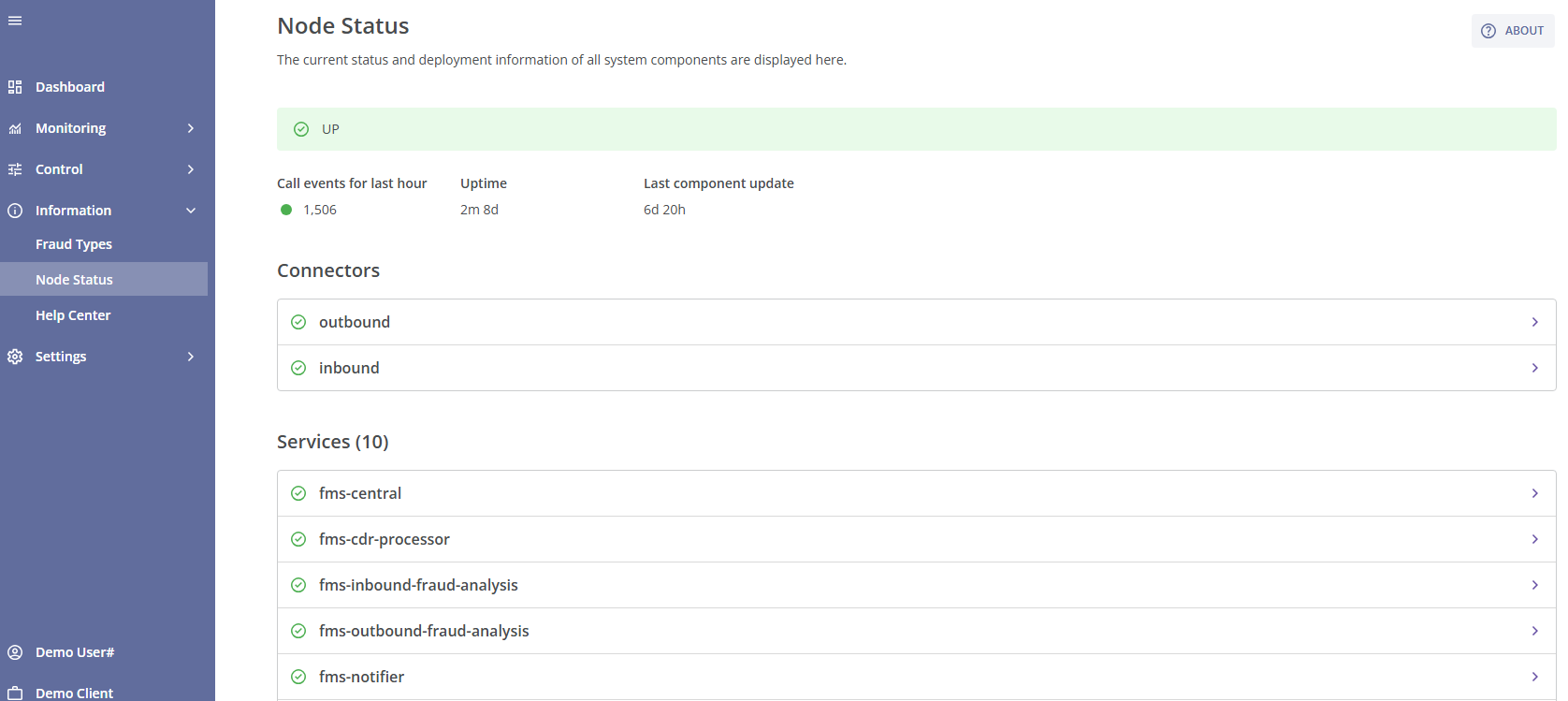
The node's main status is displayed at the top of the page:
- 'UP' status indicates that the system is operating correctly;
- 'DOWN' status means that at least one of the system services is not working (in case of fms-nofitier service, the system will work correctly except the email notifications sending);
- 'Waiting for traffic' status indicates that no traffic is currently passing through the system.
Below the main status, you will find the following information:
- The amount of call attempts during the last hour;
- Uptime (the amount of time the user interface has been operating correctly);
- Last component update (the time elapsed since the last update of a connector or service).
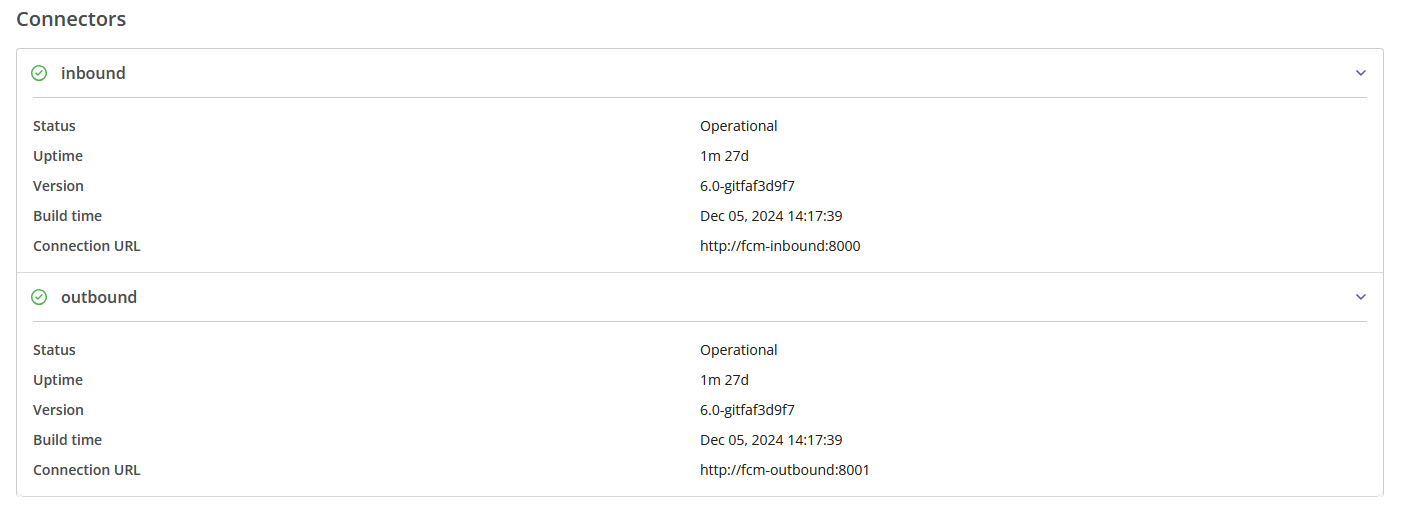
Below that, you will find information about each configured connector (its status, uptime, version, build time, and connection URL).
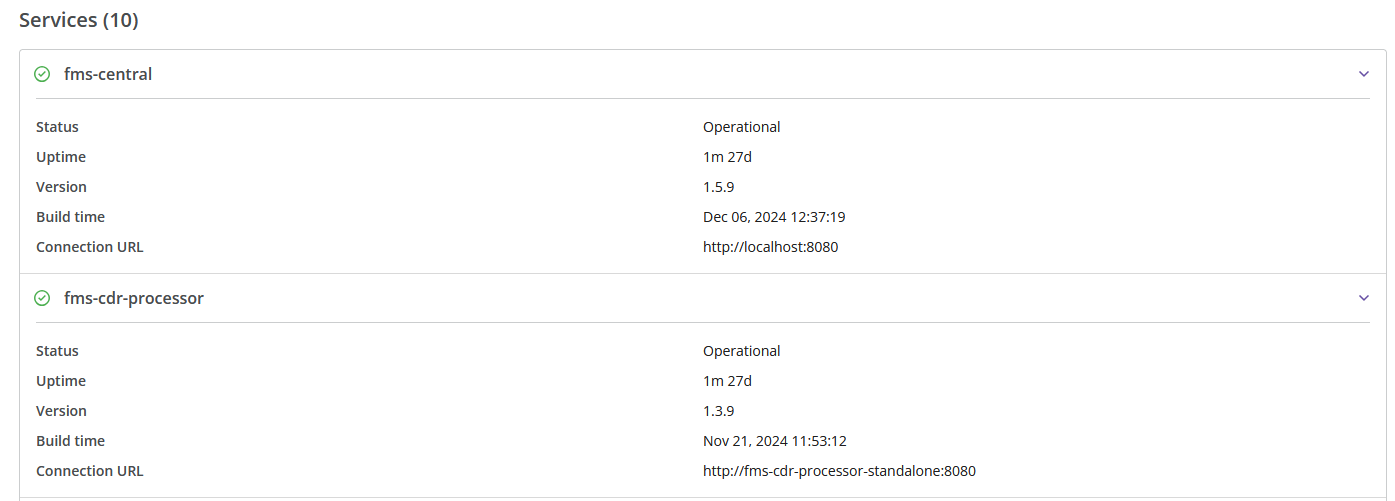
Below the connector information, you will find details about each system service (its status, uptime, version, build time, and connection URL). The amount of configured services is displayed in brackets after the section name.
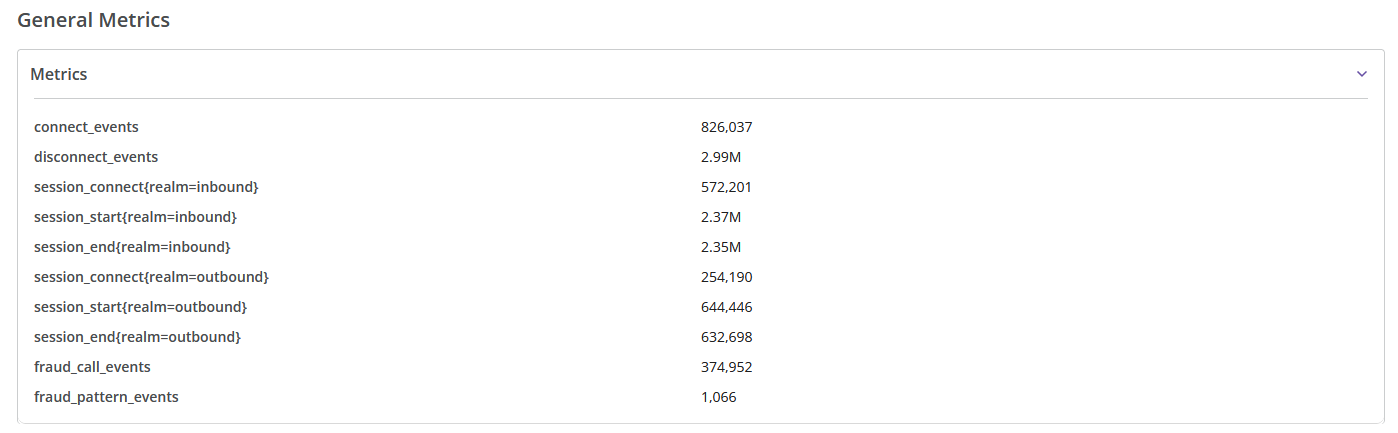
The information about general metrics is displayed at the bottom of the page.
¶ Help Center
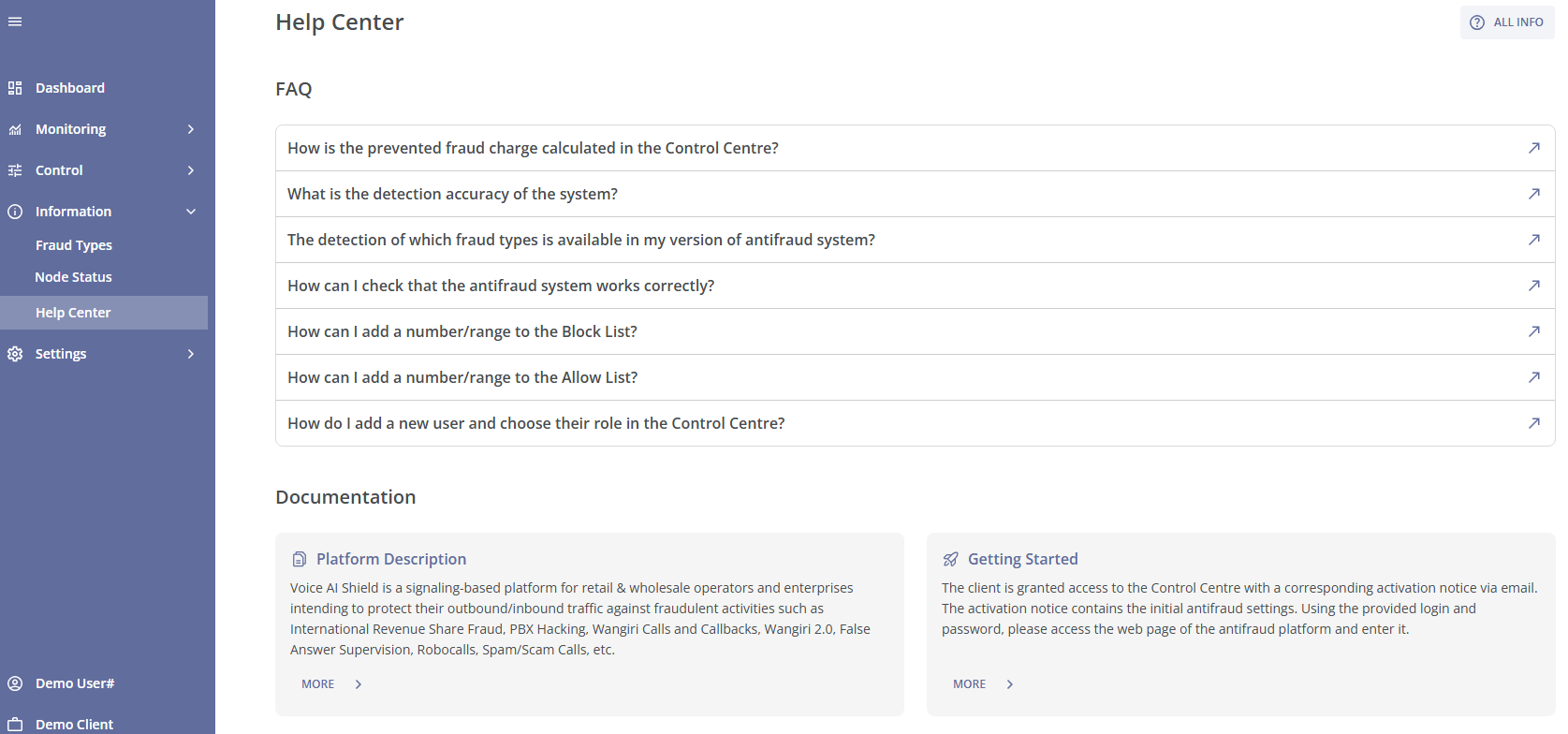
The Help Center is a quick reference for users to navigate the system’s features. It is divided into two main sections:
-
FAQ: Answers common questions about the antifraud system, such as fraud charge calculations, detection accuracy, available fraud types, managing user roles, etc.
-
Documentation: Provides an overview of the available documentation for the various system modules and settings.
Clicking the ? ALL INFO button in the top-right corner of the Help Center page will take you to the documentation associated with the Control Centre.