In this section, the color scheme shown in the screenshots may differ from the actual appearance of the Control Centre.
On this page, you will find details about the Fraud Rules module, that allows you to set up the needed traffic protection policy with the use of the AI-based methods: Proactive Monitoring and Behavioral Analysis.
We strongly advise to read the Recommendations section before making any changes in this module.
¶ How to Set up Fraud Rules
Our AI engine, used in Proactive Monitoring and Behavioral Analysis methods, allows the system to detect very well-disguised fraud attacks and even fraud preparations on hubbing and retail traffic.
These methods utilize unique approaches to fraud analysis, based on advanced machine learning (deep neural networks) and mathematical modeling.
By establishing well-designed blocking and alerting policies in the Fraud Rules (for each fraud type), you can eliminate fraud with minimal possible losses, or even avoid fraud-related damages at all.
You can view this and any corresponding documentation page directly from the Control Centre by clicking the ? ABOUT button in the top-right corner of the page.
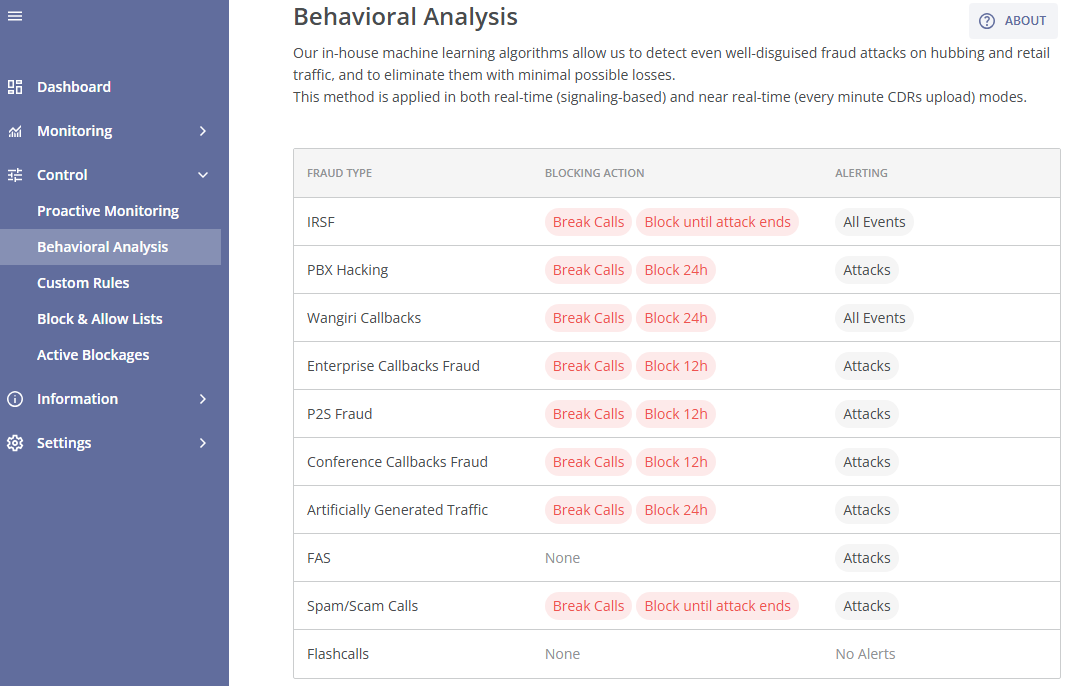
The Fraud Rules module consists of two main tabs:
- The RULES tab with the main Fraud Rules table;
- The ACTIVITY LOG tab with the history of changed made to the module.
In the RULES tab, you can set blocking and alerting actions for the fraud types that are available in your antifraud system version. You can find information about each fraud type (and its description) that the antifraud system is capable of detecting, including those that are not yet available in your version, in the corresponding module Fraud Types (described in the Information module group).
The algorithms of Proactive Monitoring can discover a single high-risk call attempt or a fraud attack preparation, which may include several fraudulent call attempts.
For the Behavioral Analysis method, when its AI detects a fraud attack, it determines the attack's parameters (including A-/B-number ranges of the attack).
Both methods deliver extremely high performance, with near-complete detection of fraud attacks, minimal detection delays, and an exceptionally low false positive rate.
The antifraud system uses over 200 fraud parameters to identify a fraud attack.
You can change the current settings for each fraud type by clicking the corresponding row (fraud type rule). This will take you to the Edit Rule page.
Here you will find the fraud type of the rule, and the corresponding configurable blocking and alerting actions.
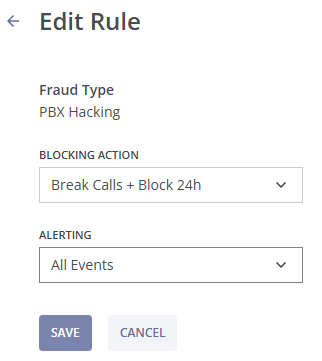
The blocking action can be enabled or disabled using the toggle:
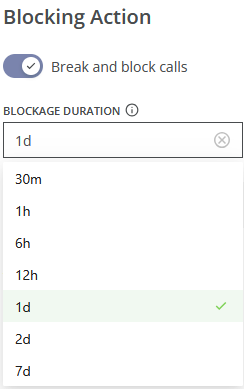
- If the blocking action is toggled off, no blocking action is applied to fraudulent call attempts of the specified fraud type;
- When the "Break and block calls" option is enabled, active fraudulent call attempts of the specified fraud type that match the corresponding A-/B-number ranges of the attack will be broken. A blockage is then set for those A-/B-number ranges for the specified duration (you can enter the blockage duraton manually or select it from the dropdown list). During this time, all further fraudulent call attempts that match the blockage criteria within the chosen window will be rejected.
The blockage window should be long enough to ensure that, after its expiration, fraudsters do not continue the activity.
Depending on your antifraud system version, the blocking actions may be unavailable. To upgrade your version, please contact your manager.
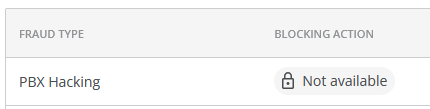
For some fraud types, the blocking action is not applied in the antifraud system, e.g. Flashcalls.
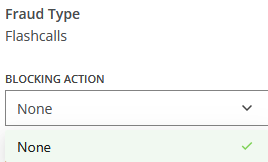
However, you can request a special flashcalls blocking feature to enable flashcalls blocking. To upgrade your version, please contact your manager.
Following that, you can enable or disable alerting to the specified Notification Channels:
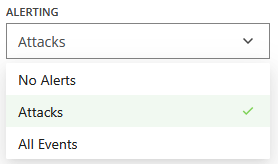
You can adjust communication channels for alerts in the Fraud Alerts module of the Alerts & Reports module group.
After selecting the needed options, click the SAVE button to apply the changes, or the CANCEL button to cancel the changes and exit the Edit Rule page.
You can view the history of changes made to the settings of the Fraud Rules module in the ACTIVITY LOG tab.
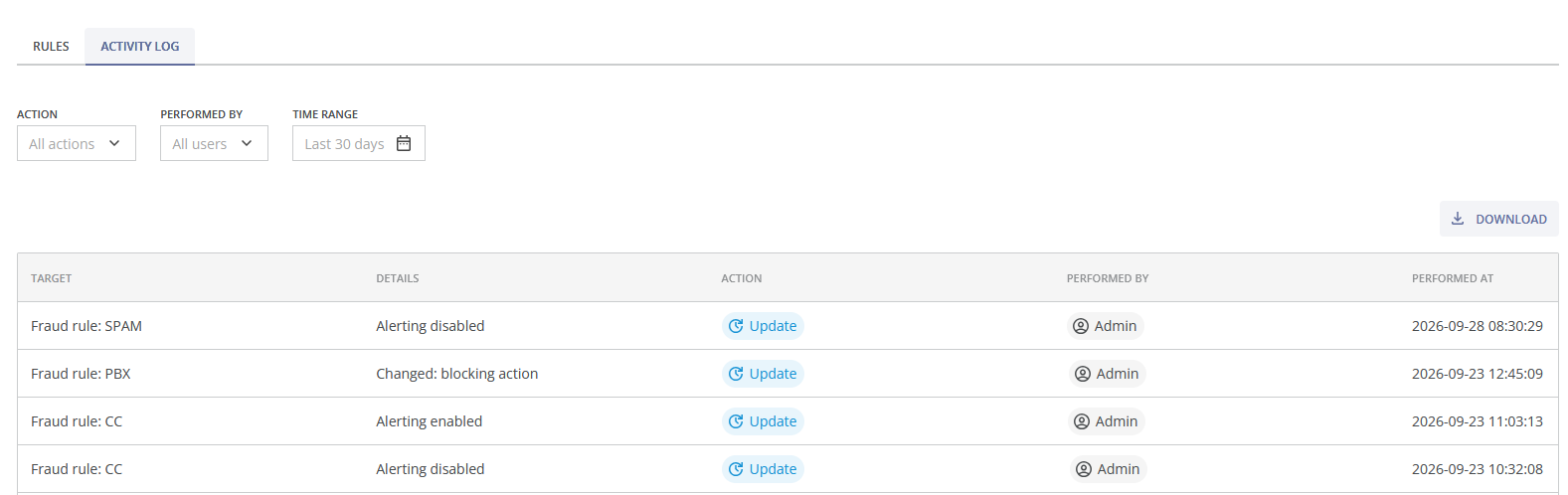
You can use the following filters at the top of the table to narrow the displayed data:
- Action: Filters records by action type (Create, Update, Extend, Delete, etc)
- Performed by: Displays activities performed by a specific user;
- Time Range: Limits results to a selected date range (you can select one of the suggested intervals from the dropdown list, e.g., Last 24 Hours, Last 7 Days, Last 30 Days, or specify a custom interval)
The activity table displays all recorded activities matching the selected filters. Activities are displayed in reverse chronological order, with the most recent events shown first. The following columns are displayed:
- Target: The fraud rule affected by the action;
- Details: A summary of the performed operation or the changes made;
- Action: The type of operation performed (displayed as a colored status badge);
- Performed By: The user that initiated the action;
- Performed At: Indicates when the activity occurred. Recent events are displayed in relative time (e.g., "2h ago"), while older entries display the full timestamp.
You can click the LOAD MORE button at the bottom of the table to display more entries.
To download the filtered data, click the  DOWNLOAD button. You can choose the file format (csv or tsv) and the separator (semicolon, comma, or tab).
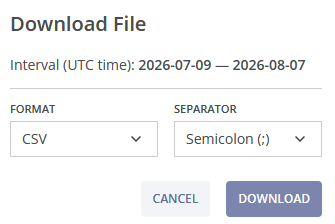
The exported file contains the following columns:
- Performed at (UTC): Date and time when the action was performed;
- Action: Action type;
- Actor ID: Internal identifier of the user who performed the action;
- Performed By: User name;
- Target Entity Type: Type of the affected object;
- Target Entity ID: Internal identifier of the affected object;
- Target Entity Name: Name of the affected object;
- Details: Additional information about the operation, if available;
- Raw Data: Complete JSON payload containing all recorded event details.
